Wedding
Wedding QR code: how to use it for photos, info and memories
Learn how to use a QR code at your wedding to collect photos, share information and create unique memories with all your guests.
 Fede from Togevent
Picture the scene: the reception is in full swing, guests are laughing, toasting and snapping dozens of photos on their phones. Spontaneous, once-in-a-lifetime moments that, the next day, risk getting lost among WhatsApp chats, disappearing Instagram stories and "I'll send them tomorrow" promises left hanging for weeks.
Yet the solution is within reach, or rather, within camera range: a QR code for your event.
A wedding QR code helps you solve this chaos with one simple gesture: a scan from a phone. No app to download, no complicated instructions. Just a single point of access where everything comes together: photos, information, schedule, wedding registry.
In this guide we look at how it really works, where to place it, what guests see and why more and more couples are choosing it to plan their special day as smoothly as possible.
Why a wedding QR code makes your life easier
Planning a wedding means juggling dozens of details at once. When the big day arrives, the last thing you want is to worry about how guests will find information or how you'll collect their photos.
A wedding QR code works like a digital front door: one scan and the guest has everything at their fingertips. No digging for links in old chats, no app to download, no need to ask anyone.
Here's what actually changes:
Zero confusion: a single point of access for all the event information
No app required: guests get in straight from the browser, in seconds
Automatic photo collection: all the pictures end up in the same album, with no chasing after them
Real-time updates: if a time changes or you need a last-minute announcement, just update the page
The mechanism is always the same: you create a digital space for your event, generate the QR code that points to that space and show it to your guests. What really makes the difference is how simple the experience is for the people using it.
How a wedding QR code works (in practice)
It's simpler than it sounds. You don't need technical skills, a website or hours lost in tutorials and online generators.
With Togevent, the process comes down to three steps:
Create your event on Togevent: you instantly get a dedicated space with a shareable link, where you can add all your wedding information.
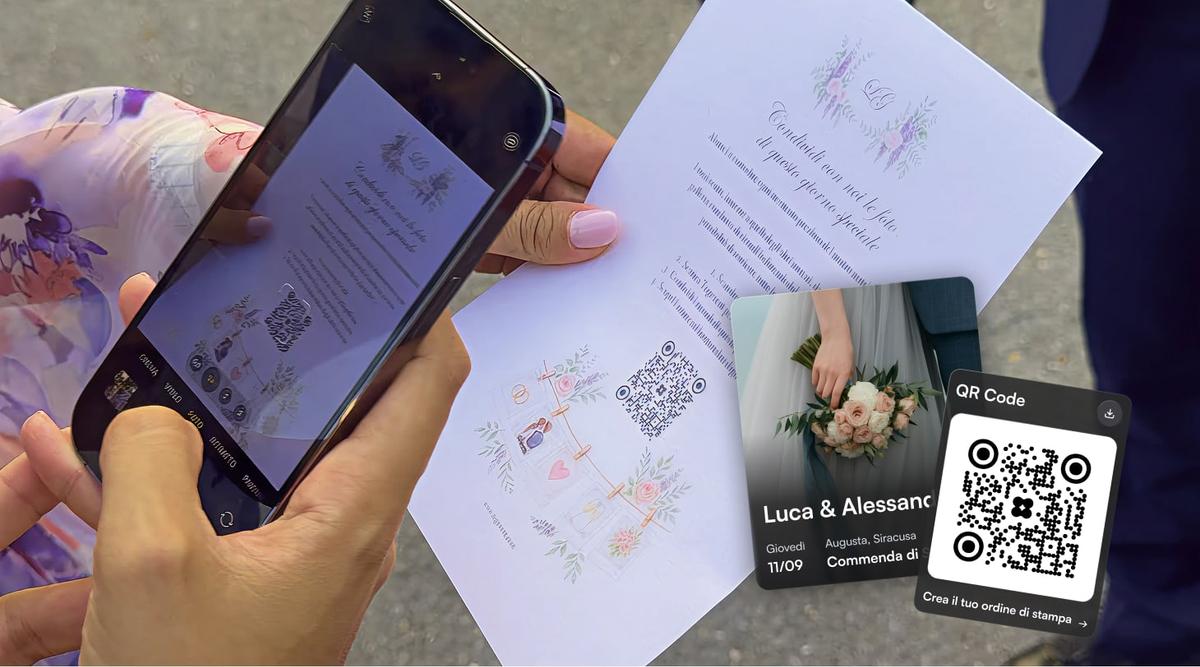
Activate your unique QR code (included in every plan): one scan takes guests straight to the event page.
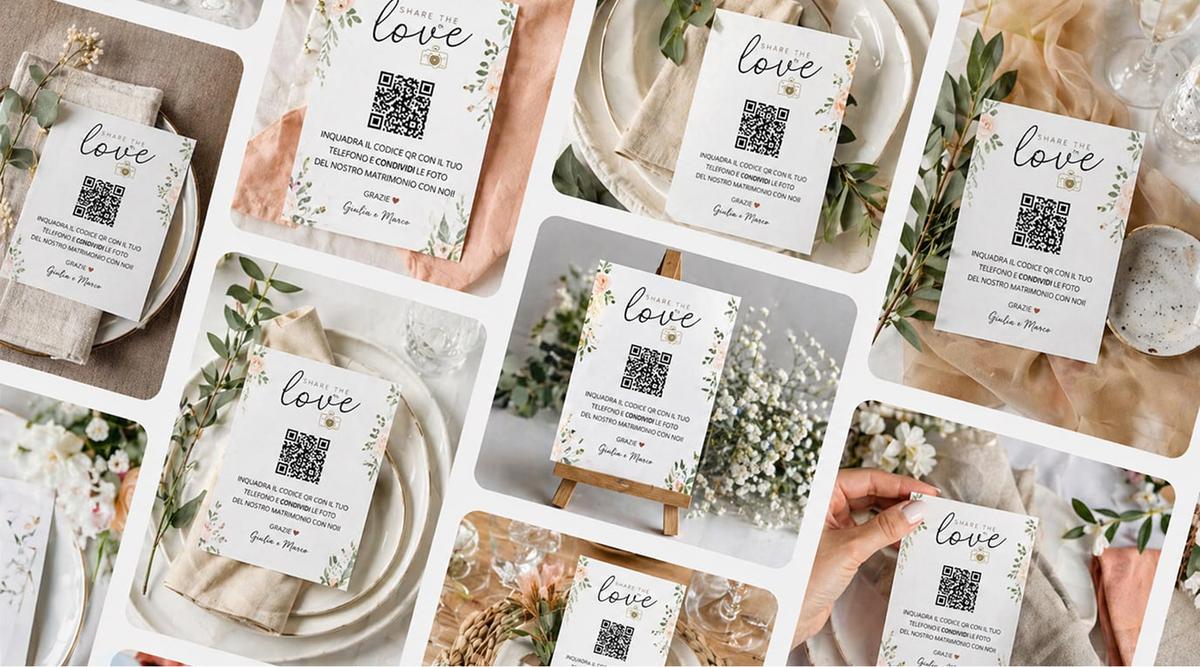
Display the QR code: download it and print it on the tables, add it to your seating chart, put it at the venue entrance or show it on a screen. With Togevent you can also design and print custom cards with your event's QR code: choose a ready-made template, adapt it to your style and have it delivered to your door. One less detail to organize, already matched to your wedding.
There's no need to generate the QR code separately on external sites. No complicated sign-up, no app to download: with Togevent, everything lives in a single space, ready to go. No need to link Google Drive folders or set up albums on different platforms. That's the beauty of a QR code: it works for everyone, even people who aren't very comfortable with technology.
What guests see after scanning
After pointing their phone camera at the QR code, the guest lands right away in a digital space dedicated to the wedding.
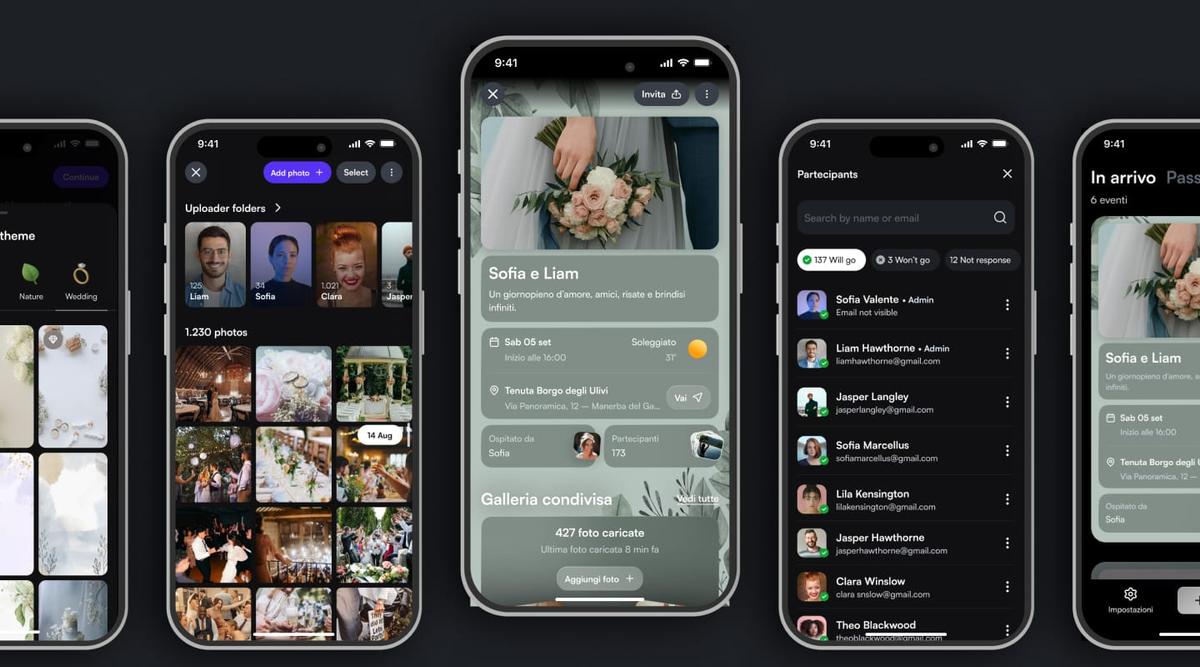
You can choose to use Togevent in a simple way, creating just the shared gallery, where guests can upload their own photos and videos and browse everyone else's in real time.
Or you can create the complete wedding space, which besides the gallery includes everything you need to guide your guests through the day:
Shared album: guests can upload their own photos and see everyone else's, in real time
The day's schedule: ceremony, reception, cake cutting and all the key moments
Practical details: venue address, parking directions, dress code and useful information
Wedding registry: viewable right from the same space
Everything is accessible in seconds, with no sign-up and no app to download.
A wedding photo QR code without an app: is it really possible?
It's one of the most frequently asked questions: "Do guests need to download a wedding app?"
With Togevent, the answer is: absolutely not!
With a wedding photo QR code, no app needed, the process is instant: the guest scans, the browser opens and they upload the photo. Done. It works on any smartphone, Android or iPhone alike, and takes up no storage on the phone.
This simplicity really makes a difference, especially when your guests span different ages and digital habits. The simpler the process, the more photos you'll collect — and the more memories you'll have to relive.
Collect photos with a QR code and create a shared album for your wedding
If your wedding QR code has one main goal, it's usually this: getting all the photos into a single space, without chasing guests across WhatsApp, DMs and "I'll send them tomorrow" messages.
With a wedding photo QR code, guests scan the code, the event page opens and they can upload right away from the browser. The result: the album builds itself during the party, as the memories come to life.
Every guest adds their own perspective: the toast from the friends' table, the bouquet toss from a different angle, the kids playing in the garden, the most emotional moments. These candid shots complement the photographer's work and tell the story of the day authentically. At a reception with 80 guests, it's normal to collect hundreds of photos within a few hours — moments nobody would ever have shared otherwise.
With Togevent, your shared wedding album:
Updates in real time: photos arrive as they're taken
Requires no app: all it takes is a QR code scan and an upload from the browser
Is built into the event space, with no external setup
Stays accessible after the event ends: you can revisit, browse and download the photos at your own pace
Where to put the QR code at your wedding (practical ideas)
A QR code only works if guests see it. It sounds obvious, but many couples print it in a single spot and then wonder why so few people use it. The secret is visibility: the more touchpoints you create, the more people will scan it.
Here are a few ideas that work well:
On the reception tables: a small, elegant card with the QR code and a line like "Scan and share your photos"
At the venue entrance: a clearly visible sign that welcomes guests and invites them to connect
On the seating chart: built into the design, next to the table assignments
On a screen or monitor: if the venue allows it, show the QR code on rotation on a display
On your invitations or digital invite: for anyone you want to give access to the information before the wedding, too
In the photo booth area: if you've set up a photo corner, the QR code invites guests to upload those shots too
How to tell guests about the QR code (ready-to-use messages)
Even the best-placed QR code needs a little help: a clear message explaining what to do. Here are three ready-made templates to adapt.
With your invitations or digital invite:
On our wedding day you'll be able to share your photos in our gallery. Just scan the QR code you'll find on the tables or use this link: [link]
A few days before (WhatsApp or email):
We're almost there! During the wedding we'd love to collect photos from all of you in a single album. No need to download anything: just open the link on your phone or scan the QR code you'll find on the tables.
On the day (on the table card):
Scan the QR code and share your photos. Every shot counts!
A tip that makes all the difference: ask two or three trusted friends to act as "ambassadors." They'll remind the other guests to upload their photos during the party, so you don't have to think about it.
Togevent: QR code, album and everything else in one space
What sets Togevent apart from other solutions is that the QR code isn't just a code to print or share. It's the gateway to whatever you've chosen to create for your wedding.
You can use it to give guests access to the shared gallery, where they upload and browse the event photos in real time. Or you can link it to the complete wedding space, a dedicated digital page that, besides including the shared gallery, brings the schedule and useful information together in one place.
That way, on the wedding day, guests don't have to hunt for different links, post in WhatsApp groups or ask the couple for details: one scan is all it takes to find everything they need.
With the complete Togevent space you can manage:
Shared album, to collect photos from all your guests
The day's schedule, with times, key moments and activities
Wedding registry, viewable directly by guests
Event details, such as venue, parking, dress code and practical information
Everything lives in a single space, accessible in seconds, with no sign-up and nothing to download.
Togevent's QR code is available on every plan and is unique to each event. With a single scan, guests go straight to the shared gallery or to your wedding's dedicated space, with no steps in between.
You can also design and print custom cards with your QR code: choose a ready-made template, adapt it to your event's style and have it delivered to your door. One less detail to organize, already matched to your wedding.
One QR code for photos, info and memories
Every wedding is unique, but the most beautiful memories are the ones that get shared. With a clearly visible QR code, you give your guests instant access to everything they need, and you collect their photos without chasing links and messages.
Want a shared album with no app, an always up-to-date schedule and one space for all the information?
Try Togevent: create your event, activate the QR code and let your guests upload photos and check the schedule and details in seconds, straight from their browser.
Create your wedding QR code
Want to create a custom QR code for your event? Check out our wedding QR code page and start collecting photos, information and memories in one place.
Fede from Togevent