Wedding
How to collect wedding photos from your guests without the stress (2026)
Learn how to collect and share all your wedding guests' photos in a simple, stress-free way. The complete 2026 guide.
 Fede from Togevent
The wedding ended just a few hours ago. The party was perfect, the hugs heartfelt, the laughter contagious. And now, as you think back on it all, an inevitable question comes up: where did all the photos your guests took end up?
The photographer captured the key moments, of course. But there's a whole "behind the scenes" that often escapes even the most attentive lens: shots that only exist on your guests' phones. They're spontaneous, authentic images, like knowing glances, genuine laughter, little details.
The problem is that these guest photos can get lost fast: they end up in WhatsApp chats, become Instagram stories that disappear, or stay stuck in promises like "I'll send them to you later"… that nobody ever keeps.
So after the honeymoon, you find yourself chasing relatives and friends with messages, reminders and "I'll send them over as soon as I can", while those images stay buried among thousands of others in someone's camera roll.
This guide is here to help you avoid all that. Let's look at how to collect wedding photos from your guests in a simple, stress-free way.
What the photographer doesn't see
A professional photographer is essential. They know how to catch the right light, compose the perfect frame and capture the emotion of the first look and the first dance. But no matter how good they are, they can't be everywhere.
While they're photographing the ceremony, someone at the college friends' table is taking a photo worth its weight in gold: a sudden hug, a laugh that tells the story of twenty years of friendship, a child running between the tables with untied shoes.
These are moments that no professional, however attentive, can capture. Because they happen far from the main lens, on the edges of the party where spontaneity is total.
Wedding guest photos don't replace the photographer's work. They complete it. And years later, they're often the ones that make you smile the most.
Why guest photos tell a different wedding story
Every guest experiences the wedding from a unique point of view. Someone sitting at the coworkers' table has a different perspective from someone in the front row during the ceremony. Someone who arrives late captures a moment nobody else noticed. Someone at the bar during the cake cutting photographs a detail that tells the story of the day in an unexpected way.
This mosaic of perspectives is what makes guest photos so precious.
The three main ways to collect guest photos (pros and cons)
There are several ways to ask your guests to share their shots. Each one has real advantages and limitations.
WhatsApp groups and chats
It's the most instinctive method: you create a group, ask everyone to send their photos and hope it works.
Pros:
Everyone already has WhatsApp
No explanation needed
Cons:
Photos get compressed and lose quality
The group turns chaotic within minutes
Not every guest wants to be in a group with strangers
After a few days the group goes quiet and the photos stay buried in the chat
Downloading everything becomes a real ordeal
It works for very small weddings, but as soon as the guest count grows, chaos is guaranteed.
Shared cloud folders (Google Drive, iCloud, Dropbox)
You create a folder, share the link and ask your guests to upload.
Pros:
Photos keep their original quality
There's usually enough storage space
Cons:
Many guests don't know how to upload files to the cloud
You need a Google or Apple account to access it
The interface isn't designed for this use: it's not very intuitive on a smartphone
Less tech-savvy guests give up right away
It can work as a backup, but it's not the most convenient solution for everyone.
Dedicated platforms with a link or QR code
There are services designed specifically for collecting wedding guest photos. The idea is simple: you create a dedicated space, share a link or a wedding QR code and guests upload their photos from the browser, without downloading any app.
Pros:
No app to install
Works on any smartphone
A simple experience even for people who aren't comfortable with technology
High-quality photos, organized in a single album
Access in one tap: scan the QR code or click the link
Cons:
Some platforms have storage limits or paid features
It takes a little communication with your guests ahead of time
It's the solution that best balances simplicity, quality and accessibility. No surprise, then, that in practice it's also the one that collects the most photos.
The simplest solution: Togevent and the shared gallery
If we had to sum up the secret to collecting as many photos as possible in one sentence, it would be this: make everything easy for your guests.
The more steps it takes, the fewer people take part. The simpler it is, the more photos you get.
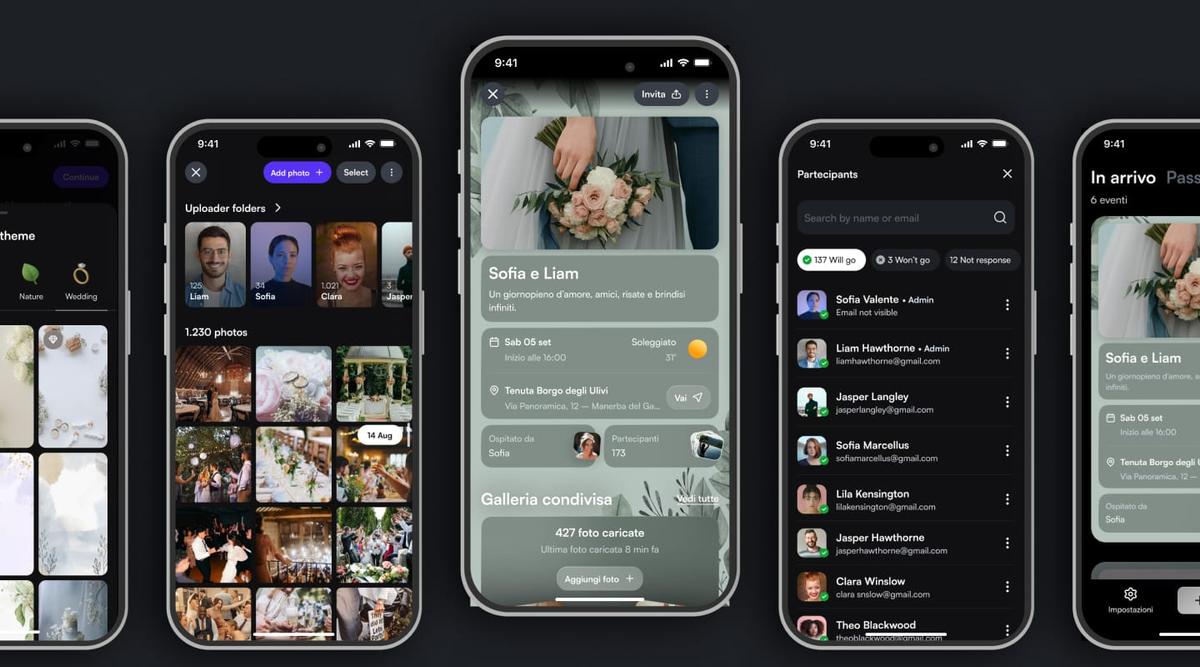
With Togevent, this space is already built into the event you create for your wedding. You turn on the shared gallery, get a link (and a QR code) and share it with your guests.
The experience for guests is instant:
They scan the QR code or open the link
They open the event page in their browser
They upload their photos in just a few taps
No app to download, no need to figure out how a cloud folder works. It works on any phone, Android or iPhone, and even the least tech-savvy guests can use it without any trouble.
But Togevent is much more than a wedding photo app. In the same space you can:
share the day's schedule and the venue details
post updates and announcements on the announcement board
Everything in one place, accessible with a single scan. The gallery updates in real time, letting you keep and relive those moments long after the day, without chasing anyone to get the photos.
How to tell your guests: ready-to-copy messages
Even the most carefully crafted space isn't much use if your guests don't know it exists. Here are three ideal moments and the messages to use.
1. With your wedding invitations or digital invite
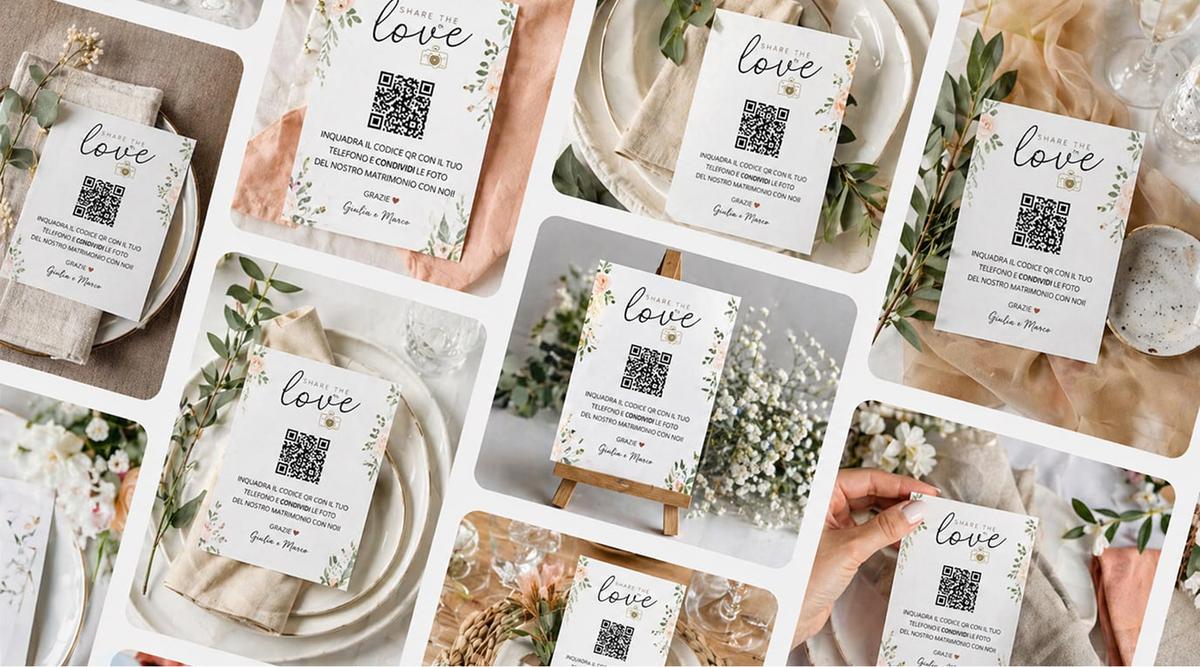
On the wedding day you'll be able to upload your photos to our shared gallery. Just scan the QR code you'll find on the tables or use this link: [link]
2. A few days before the wedding (WhatsApp or email)
We're almost there! On the wedding day we'd love to collect photos from all of you in a single album. No need to download anything: just open this link on your phone and upload your photos. You'll also find the QR code on the tables.
3. On the day itself — where to place the QR code
On place cards or centerpieces
At the reception entrance
In the photo booth area
On the seating chart
A small sign that says "Scan and share your photos" is enough to win over even the most distracted guests.
Bonus tip: ask a couple of trusted friends to act as "ambassadors" and remind everyone to upload their photos during the party.
How to organize and save everything without losing a thing
Collecting the photos is only the first step. Here's a practical checklist:
Choose a single collection point before the wedding and tell everyone about it. Avoid photos scattered across WhatsApp, email, Drive and different platforms.
Keep the link active after the wedding too. Not everyone will upload on the day itself. Give latecomers at least two weeks.
Back up as soon as possible. Download all the photos and save them to an external drive or a cloud service. Don't rely on a single copy.
Organize the photos by moment: ceremony, cocktail hour, reception, party, portraits. Even a simple breakdown makes everything more enjoyable.
Thank your guests. A message after the wedding saying "thanks for the photos" closes the loop and makes everyone feel part of the memory.
With Togevent the gallery stays accessible after the event too. You can browse, download and create a shared album with every shot.
Fede from Togevent